Overview
What is OaaS?
OaaS (Operator as a Service) is an automated virtual operator that integrates with your CMS software. When an alarm triggers, OaaS considers options and then engages your contacts on your behalf — via phone (IVR or AI voice), SMS, email, or chatbot. OaaS captures their response and runs a structured plan to resolve the activation, escalating to a real operator when appropriate.
What events can OaaS handle?
OaaS can handle any alarm or event type — Late to Close, Open Out of Hours, low battery, environmental, system, intruder, fire, or anything your CMS raises. You decide which event types OaaS picks up and which it leaves to your operators.
It also supports "engage-only" actions — one-off OaaS engagements an operator can trigger from inside an existing activation. With one click the operator can have OaaS make an IVR call, an AI voice call, or open a chatbot session with a chosen contact, and record the contact's response into the activation.
It also supports "engage-only" actions — one-off OaaS engagements an operator can trigger from inside an existing activation. With one click the operator can have OaaS make an IVR call, an AI voice call, or open a chatbot session with a chosen contact, and record the contact's response into the activation.
How fast does OaaS react to a new alarm?
Typical pickup is under 5 seconds from the moment the alarm reaches our server. Engagement (placing the call or sending the SMS) follows within seconds of pickup, subject to any configured delays in your plan such as sleeping activations.
How many activations can OaaS manage?
OaaS is built to handle tens of thousands of activations a day. Resources can be increased on demand to ensure fast management of all OaaS activation requests.
Can a human operator take over at any time?
Yes. Operators can claim an activation at any time, even mid-engagement. The CMS is the source of truth for ownership — the moment OaaS sees a non-OaaS operator on the activation, OaaS stands down.
By default, in-flight engagements are left running (the contact's chatbot session, SMS thread, or voice call continues unchanged), but the plan ladder is paused — OaaS will not advance to the next contact or channel. This avoids cancelling a conversation the contact is mid-way through when the operator just wants to claim ownership.
If a company prefers a hard-cancel — all in-flight engagements stopped the moment an operator picks up — that can be enabled by toggling "Cancel engagements on stand-down" in Company Settings.
Important: once an operator has touched an activation, OaaS is permanently passive. Even if the operator releases the activation back to the queue, OaaS does NOT resume the plan — it waits for the CMS to mark the activation completed.
By default, in-flight engagements are left running (the contact's chatbot session, SMS thread, or voice call continues unchanged), but the plan ladder is paused — OaaS will not advance to the next contact or channel. This avoids cancelling a conversation the contact is mid-way through when the operator just wants to claim ownership.
If a company prefers a hard-cancel — all in-flight engagements stopped the moment an operator picks up — that can be enabled by toggling "Cancel engagements on stand-down" in Company Settings.
Important: once an operator has touched an activation, OaaS is permanently passive. Even if the operator releases the activation back to the queue, OaaS does NOT resume the plan — it waits for the CMS to mark the activation completed.
How does OaaS handle activations that restore or auto-complete?
OaaS continuously syncs each managed activation's status from the CMS. If the activation restores, an operator manually completes it, or it auto-completes, OaaS detects that on the next sync (typically within a few seconds) and unwinds itself:
• Any in-flight call, chatbot session, SMS, or email engagement is gracefully ended.
• Contacts already engaged are notified that the alarm has been resolved where the channel supports it.
• A response note is logged into the activation explaining how the CMS resolved it.
• Ownership is released and the job moves to "completed" inside OaaS.
• Any in-flight call, chatbot session, SMS, or email engagement is gracefully ended.
• Contacts already engaged are notified that the alarm has been resolved where the channel supports it.
• A response note is logged into the activation explaining how the CMS resolved it.
• Ownership is released and the job moves to "completed" inside OaaS.
What if no one answers the engagements?
The plan or DAIOS will exhaust the contact list, then escalate per your configuration — either to an operator queue, a fallback contact, or another engagement notification. Nothing silently disappears.
Engagement & Response
How does OaaS decide who to engage with?
OaaS uses one of two engagement modes per customer:
DAIOS mode — The system reads the alarm context, contact list, and response plan details — and can also consider prior history and contact instructions — to choose the best contact and channel automatically. Each Response Plan can carry custom DAIOS instructions to override defaults per alarm type.
Response Plan mode — Choose from a preset list of, or custom, step-by-step OaaS Response Plans.
Both modes share the same safety controls, audit logging, and override paths.
DAIOS mode — The system reads the alarm context, contact list, and response plan details — and can also consider prior history and contact instructions — to choose the best contact and channel automatically. Each Response Plan can carry custom DAIOS instructions to override defaults per alarm type.
Response Plan mode — Choose from a preset list of, or custom, step-by-step OaaS Response Plans.
Both modes share the same safety controls, audit logging, and override paths.
Can OaaS escalate through a chain of contacts?
Yes. Each contact can have multiple channels with priorities, and your plan defines the order OaaS works through the contact list. If contact A does not answer on any of their channels, OaaS moves to contact B, and so on, up to the maximum-contacts limit you've configured. Plans can also include wait steps and retry loops — for example: "try contact A, wait 10 minutes, try contact A again, then move on."
Can OaaS notify multiple contacts at the same time?
Yes. Parallel engagement is supported — useful for duress or critical events where you want every nominated contact notified simultaneously rather than sequentially. The first to respond drives the resolution; the rest are notified that the event has been handled.
Does OaaS work with contact schedules?
Yes. Contact availability windows configured in the CMS are honoured. CMS contact schedules and Response Plans are leveraged to handle contact scheduling, so out-of-hours contacts aren't disturbed unnecessarily.
How does OaaS handle sleeping activations?
OaaS can delay engagement on sleeping activations that may be expecting a restore, disarm, arm, or autocomplete. If the activation is woken, OaaS can react immediately; otherwise OaaS can wait for a fixed time window, or a combination of both. The default behaviour is configurable per company and can be overridden per response plan with the DAIOS SLEEP instruction.
What happens if a contact's phone goes to voicemail?
OaaS detects voicemail and treats the attempt as unanswered. It does not leave sensitive details on voicemail unless you specifically configure it to. It then falls through to the next channel or contact per your plan.
Can a contact ask to speak to a real operator during an engagement?
Yes. Every Resolution Group can include a "transfer to operator" option. On the IVR or AI voice call the contact says (or presses) the matching option, on the chatbot they tap a button, and on SMS they reply with the keyword.
On voice channels, if a Call Back Number is configured, OaaS bridges the live call to it immediately. When the operator answers, Twilio plays a short private whisper — announcing the contact's name, number, and the alarm type — before the operator is joined to the call. The dial outcome is posted back to the CMS as a follow-up note.
On voice channels, if a Call Back Number is configured, OaaS bridges the live call to it immediately. When the operator answers, Twilio plays a short private whisper — announcing the contact's name, number, and the alarm type — before the operator is joined to the call. The dial outcome is posted back to the CMS as a follow-up note.
Can OaaS apply LTC and OOH schedule changes directly to my CMS?
Yes. When a contact responds to a Late-to-Close or Out-of-Hours alarm with an extend, cancel, or open-early request, OaaS can post that change straight to the CMS schedule via the API — no operator action required. Supported codes: LTC Extend 15/30/60 min, LTC Cancel, OOH Extend 15/30/60 min, and OOH Open Early. If the change cannot be applied, OaaS retries briefly then escalates to an operator with a clear explanation.
Does OaaS only react to alarms pushed from the CMS, or can it proactively find activations?
Both. The standard path is reactive — the CMS pushes an alarm and OaaS handles it within seconds. In addition, Activation Selectors let OaaS proactively scan your open activation queue and pull in activations that match a filter you define — for example a given action plan, site grouping, city, alarm type, or priority.
Selectors can run in a log-only "shadow" mode first so you can see exactly what they would pick up before they act, and only ever consider unclaimed activations.
Selectors can run in a log-only "shadow" mode first so you can see exactly what they would pick up before they act, and only ever consider unclaimed activations.
Channels & Customisation
Can OaaS handle two-way conversations?
Yes — two-way on every channel that supports it: IVR (key presses and spoken responses), AI voice (natural speech), SMS and email (reply-to conversations), and chatbot (full AI dialogue). The contact's reply is always recorded against the activation.
Can we customise what OaaS says on each channel?
Yes. Voice scripts, SMS templates, email templates, and chatbot system prompts are all configurable per plan, with placeholders for site name, alarm type, time, and so on. The voice provider and voice persona used on calls can be selected per company, and the contact-facing chatbot can be re-branded with your customer's logo and colours.
What resolution options can contacts choose from?
OaaS uses Resolution Groups to define exactly what choices a contact is offered. Preset groups cover common scenarios; custom groups can be built to match your specific workflows:
Standard — acknowledge and complete, confirm false alarm, handle themselves, or escalate to operator.
LTC — standard options plus closing-time extensions (no operator needed).
Custom — duress confirmations, environmental thresholds, dispatch requests, and more. Configured per company on request.
The AI on chatbot and voice will only accept responses that map to a configured option — anything else triggers a polite refuse-and-relist.
Standard — acknowledge and complete, confirm false alarm, handle themselves, or escalate to operator.
LTC — standard options plus closing-time extensions (no operator needed).
Custom — duress confirmations, environmental thresholds, dispatch requests, and more. Configured per company on request.
The AI on chatbot and voice will only accept responses that map to a configured option — anything else triggers a polite refuse-and-relist.
Can OaaS branding be customised per customer?
Yes. Per-company branding includes a logo URL, an accent colour, a display name, and an opt-out on the "Powered by OaaS" footer. These apply to the chatbot page, the chatbot notification email, and the browser-tab favicon on contact-facing pages. Your customers' contacts see your monitoring centre branding, not OaaS.
Voice AI
What is Voice AI and how is it different from IVR?
Voice AI is a completely separate channel from IVR. Where IVR uses a fixed key-press menu, Voice AI uses an AI agent that speaks to the contact in natural language and listens to their spoken response. The contact does not need to press any keys — they can say their answer aloud.
Both IVR and Voice AI are available as channel options — you can use both side by side or pick whichever suits each customer's preference.
Both IVR and Voice AI are available as channel options — you can use both side by side or pick whichever suits each customer's preference.
Will the AI offer options that aren't in the resolution group?
No. The options the AI offers come directly from the Resolution Group configured for that engagement. If the contact asks for something off-list, the AI refuses politely and re-states what they can choose from. This guardrail is enforced on both the chatbot and the AI voice agent.
What happens if a different person answers the call?
Voice AI handles the "wrong person answers" case cleanly. If the person who picks up says something like "no, this is Matt" or "you have the wrong number," the AI politely acknowledges and resolves the engagement as NEXTSTEP_WRONG_PERSON. OaaS records "Reached a Different Person" on the CMS activation and advances to the next viable contact.
Can a contact ask to speak to a real operator during a Voice AI call?
Yes. If a Call Back Number is configured for the company, OaaS bridges the live call to it the moment the contact asks. When the operator answers, Twilio plays a short private whisper — announcing the contact's name, number, and the alarm type — before the operator is joined. The dial outcome is posted back to the CMS as a follow-up note.
Is the call recorded and transcribed?
Yes, where call recording is enabled. The AI voice transcript and call recording are saved alongside the engagement detail and linked back to the CMS activation. CMS staff can open the link directly from the activation notes to review the full conversation, listen to the recording, and see the outcome.
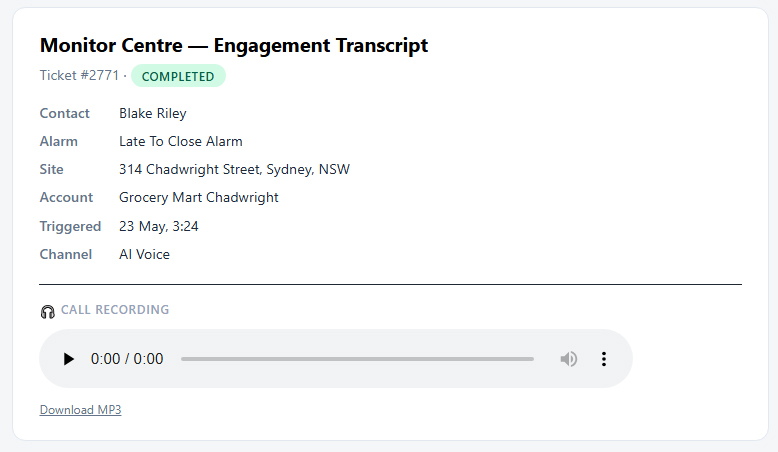
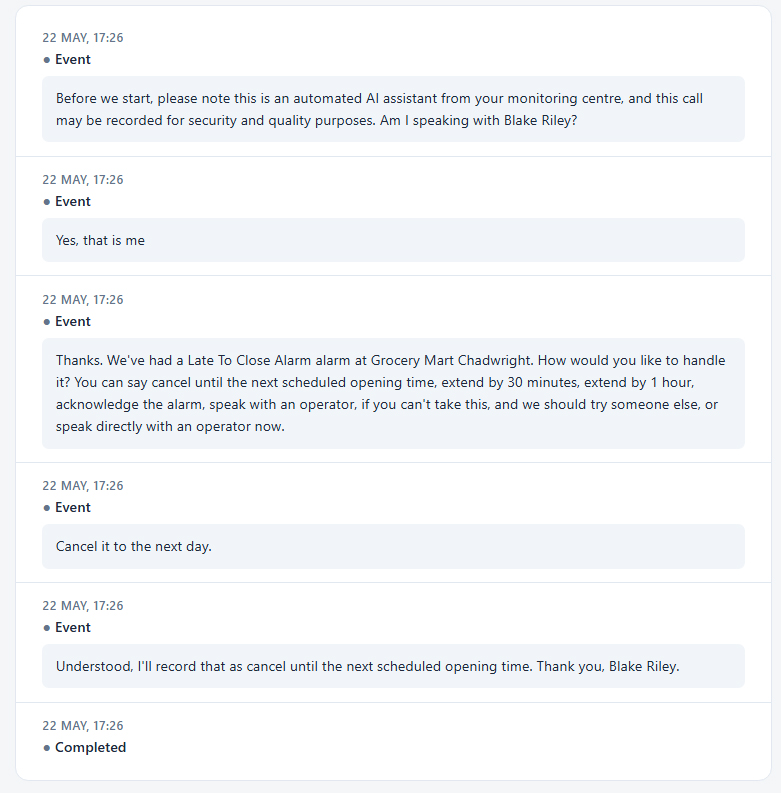
Engagement transcript — linked directly from the CMS activation note
Full AI Voice conversation — every exchange saved and auditable
Can we customise the voice persona and what the AI says?
Yes. The following are configurable per company: the legal disclosure preamble (required in many jurisdictions when AI handles a call or it's being recorded), the verification prompt wording, the message played after a failed verification, the maximum verification-attempt count, and the AI voice persona. Eight OpenAI voices are available: alloy, ash, ballad, coral, echo, sage, shimmer, and verse. PIN entry accepts either spoken digits or keypad (DTMF) — whichever the contact prefers.
What is a duress password?
OaaS supports two client-level alternates accepted on every channel: an OK Password and a Hold-Up (Duress) Password. A Hold-Up match looks identical to a normal verified response to the contact — they see no behavioural difference — but OaaS silently logs an AUDIT_SECURITY event, posts a DURESS CMS note, and escalates the activation to the operator queue. No log or transcript ever names which credential matched, so the covert path stays covert.
What if the AI voice service itself goes down mid-call?
OaaS fails gracefully rather than leaving dead air. If the AI provider can't start or sustain the conversation — for example an account quota issue or a provider outage — the contact hears a short spoken apology and the call ends cleanly. The activation advances to the next channel or contact per your plan, a clear note is recorded, and OaaS flags the provider problem on its internal health dashboard so administrators are alerted before it affects more calls.
Security & Data
Is my data secure?
Yes. When an alarm triggers, only the ticket ID is sent to OaaS. OaaS then uses the secure token-based CMS REST API to retrieve the data needed. OaaS runs on dedicated, hardened Linux servers with firewalled access, encrypted database storage, signed inter-service communication, and per-tenant data isolation.
Data retention can be set to years, months, or weeks — or data can be deleted as soon as each request is completed. Dedicated servers per company or per-customer database isolation are available. See our full Security page →
Data retention can be set to years, months, or weeks — or data can be deleted as soon as each request is completed. Dedicated servers per company or per-customer database isolation are available. See our full Security page →
Is data encrypted at rest and in transit?
Yes. Disk-level encryption is enabled on all servers. Every external connection is encrypted in transit (TLS). Each customer's operational data is held in its own isolated database with no cross-tenant query path. Every meaningful action is recorded in a tamper-evident, hash-chained audit log.
Who can see my data?
Three parties only:
You — every user you authorise on your side, scoped by role.
OaaS staff — only authorised OaaS staff, only when needed for support or troubleshooting, and only under your written instruction. All staff access is logged in the audit trail.
Nobody else — we do not sell, share, or use your data for any purpose outside of running the service.
You — every user you authorise on your side, scoped by role.
OaaS staff — only authorised OaaS staff, only when needed for support or troubleshooting, and only under your written instruction. All staff access is logged in the audit trail.
Nobody else — we do not sell, share, or use your data for any purpose outside of running the service.
How long do you keep my data?
Retention periods are configurable per company. Default periods:
• Live operational data — your custom retention period. Deletion on request at any time.
• Audit logs — 90 days online, archived for 2 years.
• Backups — 30 days rolling.
• On offboarding — a full export is provided, then all data is purged within 30 days.
• Live operational data — your custom retention period. Deletion on request at any time.
• Audit logs — 90 days online, archived for 2 years.
• Backups — 30 days rolling.
• On offboarding — a full export is provided, then all data is purged within 30 days.
Can OaaS verify the person it's engaging with before exposing any details?
Yes. OaaS supports per-contact PINs or verification codes that the contact must enter before any activation or contact information is disclosed.
The PIN is derived from the contact's data already held in your CMS — you don't need to maintain a second credential set. Failed attempts are limited (configurable, default 2) and logged. If the contact fails verification, OaaS treats the channel attempt as failed and falls through to the next contact or channel, with the failure recorded in the audit log.
This means that even if a contact's phone is answered by the wrong person — voicemail, a family member, or a stolen handset — your alarm details remain protected.
The PIN is derived from the contact's data already held in your CMS — you don't need to maintain a second credential set. Failed attempts are limited (configurable, default 2) and logged. If the contact fails verification, OaaS treats the channel attempt as failed and falls through to the next contact or channel, with the failure recorded in the audit log.
This means that even if a contact's phone is answered by the wrong person — voicemail, a family member, or a stolen handset — your alarm details remain protected.
Do you have an audit trail?
Yes. Every meaningful action — logins, configuration changes, activations being processed, manual overrides, plan edits — is recorded in a tamper-evident, hash-chained audit log. Admins can search, filter, and export the log at any time from the admin panel.
Can you guarantee no personal contact data is kept after an activation closes?
Yes — for customers with strict data-minimisation requirements, OaaS offers a per-company High-Security data-handling profile. When enabled, shortly after each activation closes, OaaS automatically pseudonymises all identifying data it holds:
• Contact names become labels ("Contact 1"); phone numbers and emails are masked
• Addresses and free-text notes are removed
• Verification secrets (PINs, OK and duress passwords) are cleared
• Conversation transcripts are not retained; call recordings are deleted
• Business/account name is removed from the audit log
What is kept (non-identifying): ticket number, account number, site city and state, resolution, timings, and channel/outcome — enough to reconcile against the full record your CMS already holds.
Pseudonymisation is one-way — once applied, original values cannot be recovered from OaaS. Read more about High-Security mode →
• Contact names become labels ("Contact 1"); phone numbers and emails are masked
• Addresses and free-text notes are removed
• Verification secrets (PINs, OK and duress passwords) are cleared
• Conversation transcripts are not retained; call recordings are deleted
• Business/account name is removed from the audit log
What is kept (non-identifying): ticket number, account number, site city and state, resolution, timings, and channel/outcome — enough to reconcile against the full record your CMS already holds.
Pseudonymisation is one-way — once applied, original values cannot be recovered from OaaS. Read more about High-Security mode →
Can you delete specific data on request?
Yes. Administrators can permanently purge all completed activation history within a chosen date range — removing records across both the decision platform and the engagement engine, including any call recordings. This is a deliberate, type-to-confirm action and is itself recorded in the audit log. Active (in-progress) activations are never touched.
Where is my data physically stored?
OaaS is hosted on professionally managed cloud infrastructure in the Sydney, Australia region. Your operational database (isolated per customer) and the application run on servers in that region. Dedicated servers or alternative-region hosting can be arranged on request.
Redundancy & Availability
What happens if OaaS goes down or cannot be reached?
If OaaS cannot be reached, the OaaS Task Plugin tries the backup connection path. The Task can queue activations and retry until OaaS recovers, then send through queued activations. The OaaS Heartbeat Account monitors connectivity and raises an alarm in your CMS if OaaS stops responding — your control room staff are notified before an issue affects live alarms.
What redundancy does OaaS have as standard?
Standard (included): rolling 30-day automated backups of every customer database, off-host backup storage, containerised deployment (spin up from latest backup in a short window), and a 99.5% monthly uptime target.
Enhanced options available: managed database with automatic failover, more frequent snapshots, multi-region backup replication, hot standby server, load-balanced multi-server deployment, and higher uptime SLA targets. See full redundancy options →
Enhanced options available: managed database with automatic failover, more frequent snapshots, multi-region backup replication, hot standby server, load-balanced multi-server deployment, and higher uptime SLA targets. See full redundancy options →
Are OaaS actions visible inside the CMS?
Yes. Every OaaS engagement and significant action is written back into the CMS as a Response Note on the activation — including contacts being engaged, the contact's response, channel fallbacks, decisions OaaS has made, and operator overrides. Your monitoring centre staff see the full timeline directly in the CMS, without switching systems.
Can we see the actual chatbot conversation or what the contact said on the IVR?
Yes. Alongside the Response Note, OaaS posts a secure link back to the CMS that opens a detail view of that engagement. From the link your CMS staff can review the full chatbot conversation history, the IVR call flow and which option the contact chose, the AI voice transcript and call recording (where enabled), the notification content sent, and timestamps and outcome.
These detail links can be protected by a CMS-side password so that even if a link is forwarded or copied, only authorised CMS users can open it.
These detail links can be protected by a CMS-side password so that even if a link is forwarded or copied, only authorised CMS users can open it.
Still have questions?
Talk to us about your specific operation — we'll walk you through exactly how OaaS fits.